Data Engineering & Parquet Optimization
Apache Parquet Partitioning: What It Is and How to Make It Simple
Converting CSV or JSON files into Apache Parquet is a great first step toward faster, more efficient analytics. Parquet's columnar format and compression can significantly reduce storage requirements and the amount of data query engines need to read.
But as datasets grow, another question becomes important: how can query engines avoid reading data they don't need?
This is where partitioning comes in.
What Is Apache Parquet Partitioning?
Partitioning is a technique for organizing a dataset into smaller, logical groups based on column values, such as a date, region, country, or customer category.
Instead of storing all records together in one large dataset, partitioning organizes files into directories that represent specific values.
For example, imagine an online store collecting millions of transactions. Each transaction contains a date, country, product, and amount.
Without partitioning, the data might look like this in Amazon S3:
s3://my-bucket/sales/
    sales-001.parquet
    sales-002.parquet
    sales-003.parquet
    sales-004.parquet
With date-based partitioning, the same dataset could be organized like this:
s3://my-bucket/sales/created_date_month=2026-09/
        sales-001.parquet
s3://my-bucket/sales/created_date_month=2026-10/
        sales-020.parquet
        sales-021.parquet
s3://my-bucket/sales/created_date_month=2026-11/
        sales-030.parquet
        sales-031.parquet
This directory structure follows a common convention called Hive-style partitioning, where directory names contain partition keys and values.
When a query requests only transactions from November 2026, a compatible query engine can identify the relevant partition instead of scanning files from every month.
Why Partitioning Matters
Partitioning helps query engines skip entire groups of files that do not match a query's filters.
This technique, known as partition pruning, can reduce the amount of data scanned, improve query performance, and lower scan-based query costs.
How Partitioning Works in Amazon S3
Amazon S3 does not have traditional directories. It stores objects identified by keys, and those keys can contain prefixes that look like folder paths.
Partitioning uses these prefixes to create a logical directory structure.
For example, consider a dataset with these columns:
order_id | order_date | country | amount
1001     | 2026-10-28 | US      | 120
1002     | 2026-11-01 | US      | 150
1003     | 2026-11-02 | DE      | 200
1004     | 2026-11-03 | US      | 300
1005     | 2026-12-05 | DE      | 180
When Parqify partitions the dataset by order_date with the year-month setting, it writes one folder per month.
The key is the column name plus _month, and the value is YYYY-MM.
So it will look like this on S3:
s3://my-bucket/orders/
                    order_date_month=2026-10/
                                            orders.csv-00000.parquet
                                            orders.csv-00001.parquet
                    order_date_month=2026-11/
                                            orders.csv-00000.parquet
                                            orders.csv-00001.parquet
                    order_date_month=2026-12/
                                            orders.csv-00000.parquet
orders.csv-00001.parquet 
Now imagine an analytics query requesting only US orders from November 2026.
SELECT *
FROM orders
WHERE order_date_month = '2026-11'
  AND country = 'US';
Register the table in Amazon Athena with order_date_month as a partition column. Athena then reads only the files under order_date_month=2026-11/ and skips October and December.
Partitioning Is Not the Same as Parquet Compression
Partitioning and compression solve different problems.
- Parquet columnar storage: Allows analytical engines to read only the columns required by a query.
- Compression: Reduces the physical size of stored data.
- Partitioning: Helps query engines skip entire groups of files based on partition values.
These techniques complement each other. A well-organized Parquet dataset can benefit from column pruning, compression, and partition pruning at the same time.
Why Partitioning Can Be Complicated
The concept is simple, but implementing partitioning correctly often requires additional data engineering work.
A typical custom implementation may involve:
- Selecting suitable partition columns
- Handling date and timestamp data types
- Extracting year, month, or day values
- Generating consistent partition directory paths
- Grouping records into the correct partitions
- Writing Parquet files to the correct destinations
- Managing schemas and compression settings
- Avoiding excessive numbers of small files
- Handling errors and monitoring processing jobs
Developers may use Python, Apache Spark, or other data processing frameworks to build these workflows. However, maintaining custom data-processing code adds complexity, particularly for teams without dedicated data engineers.
How Parqify Makes Parquet Partitioning Easier
Parqify simplifies the process by providing a web-based interface for configuring Parquet conversion, optimization, and partitioning.
Instead of writing custom scripts to generate partitioned datasets, users can configure partitioning directly in the Parqify interface.
Parqify supports converting CSV and JSON into Parquet, as well as processing existing Parquet datasets. It runs inside your own AWS account, keeping your data and infrastructure under your control.
1. Select Your Data Source
Start by creating a configuration and selecting the source files you want to process.
For example, your source might contain CSV files in Amazon S3:
s3://my-bucket/raw/orders/Choose a destination for the optimized Parquet dataset:
s3://my-bucket/analytics/orders/Parqify handles the conversion and writes the resulting files to the configured destination.
2. Choose Partition Columns
Parqify provides a partitioning configuration interface where you can select columns from the dataset schema.
For example, if your data includes
order_date, country,
and customer_id, you can choose the
columns that best match your analytics requirements.
The interface displays available partitioning options based on the selected column's data type.
3. Configure Date-Based Partitioning
Parqify makes date-based partitioning straightforward. Select a date column and choose how you want to organize your data.
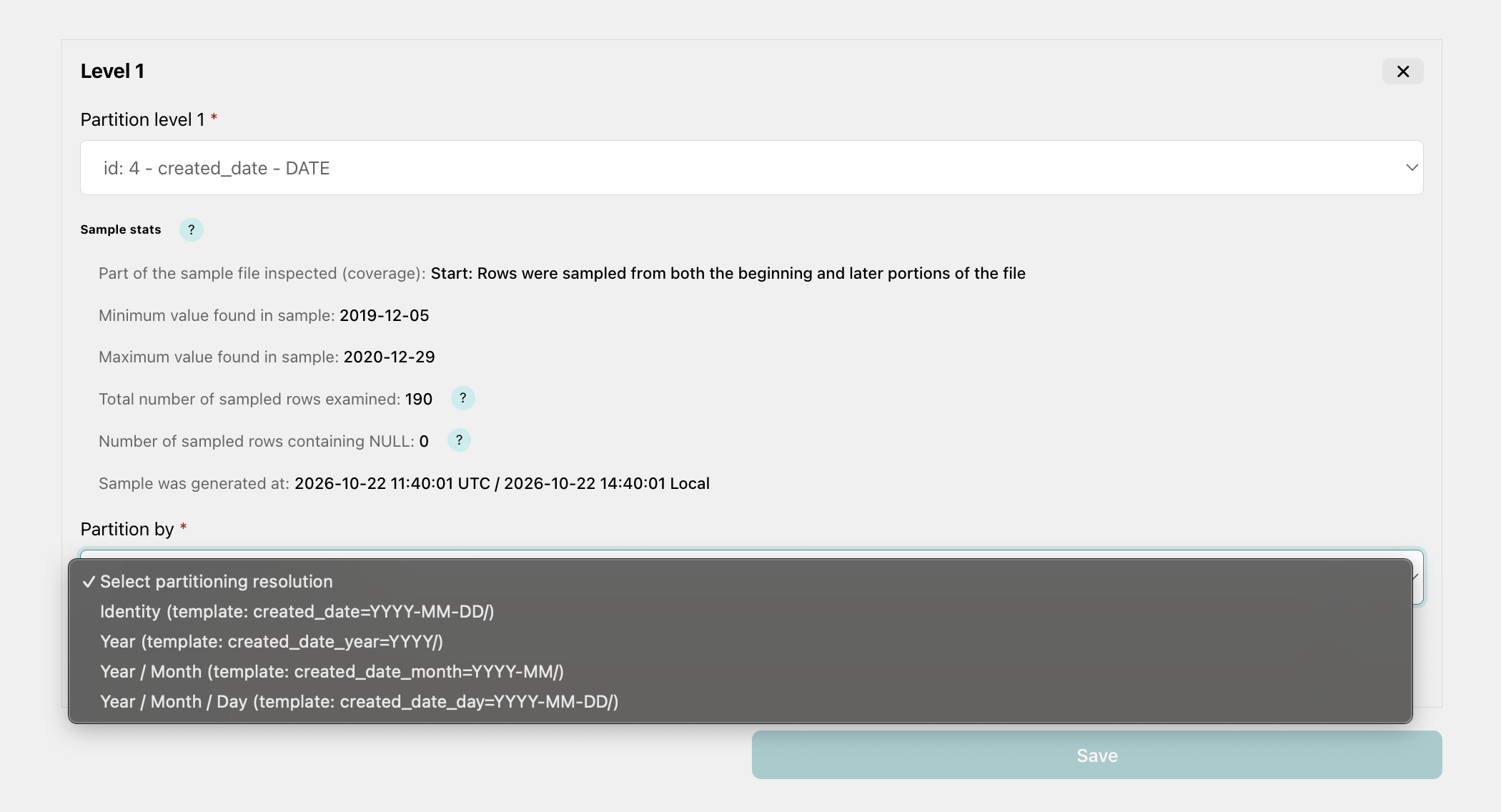
Four partitioning options are available:
-
Identity:
Preserve the original date value.
Example:
created_date=2026-11-10/ -
Year:
Group records by year.
Example:
created_date_year=2026/ -
Year / Month:
Group records by month.
Example:
created_date_month=2026-11/ -
Year / Month / Day:
Group records by day.
Example:
created_date_day=2026-11-10/
Each option creates a single partition directory
containing the selected date resolution.
For example, daily partitioning generates
created_date_day=2026-11-10/,
rather than separate year, month, and day directories.
Here we choose a partition by Year / Month
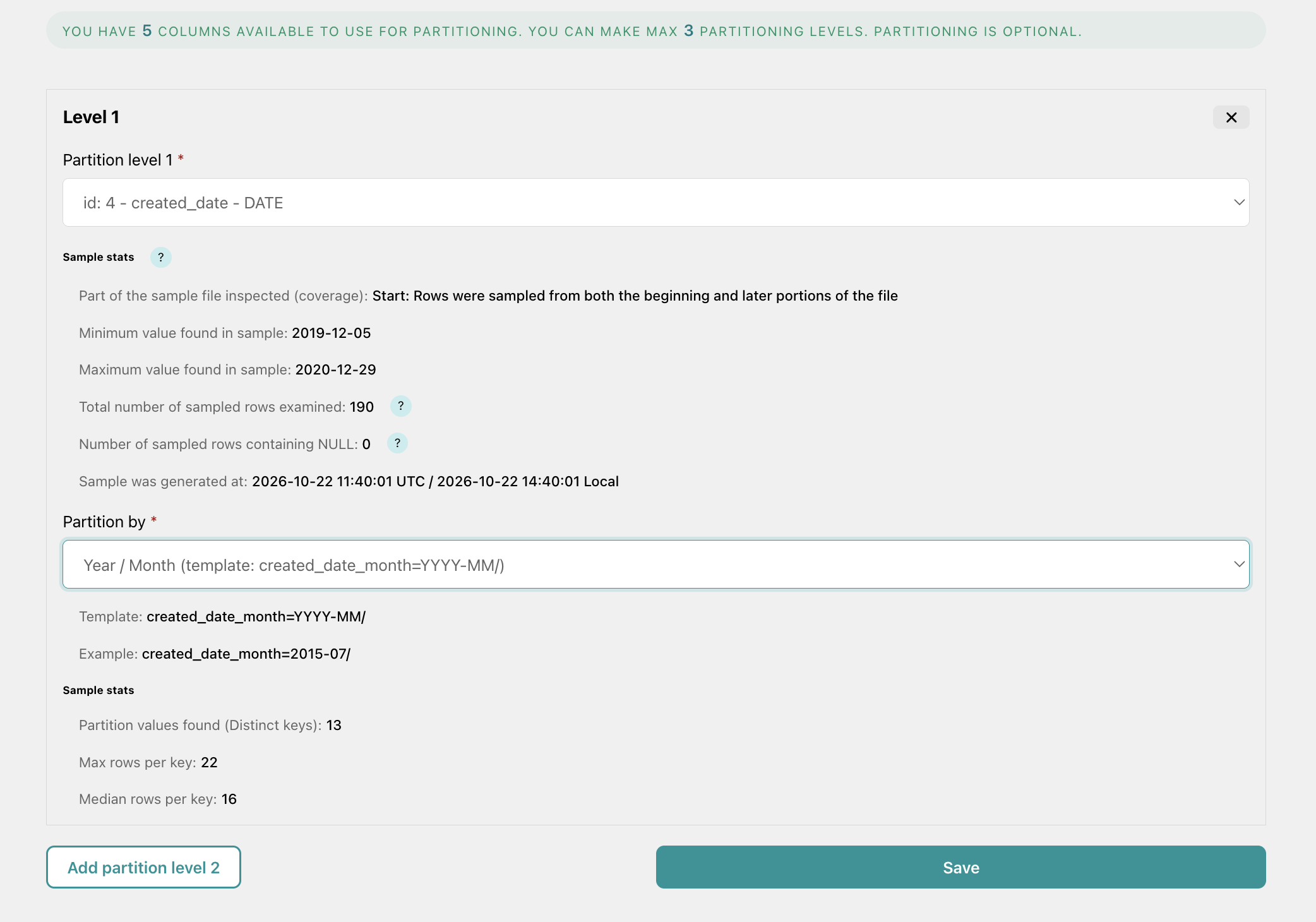
Parqify automatically generates the partition path template and shows an example in the interface, so you can understand how your data will be organized before starting the job.
4. Preview the Partition Structure
Parqify provides partition path templates and examples when configuring partitioning.
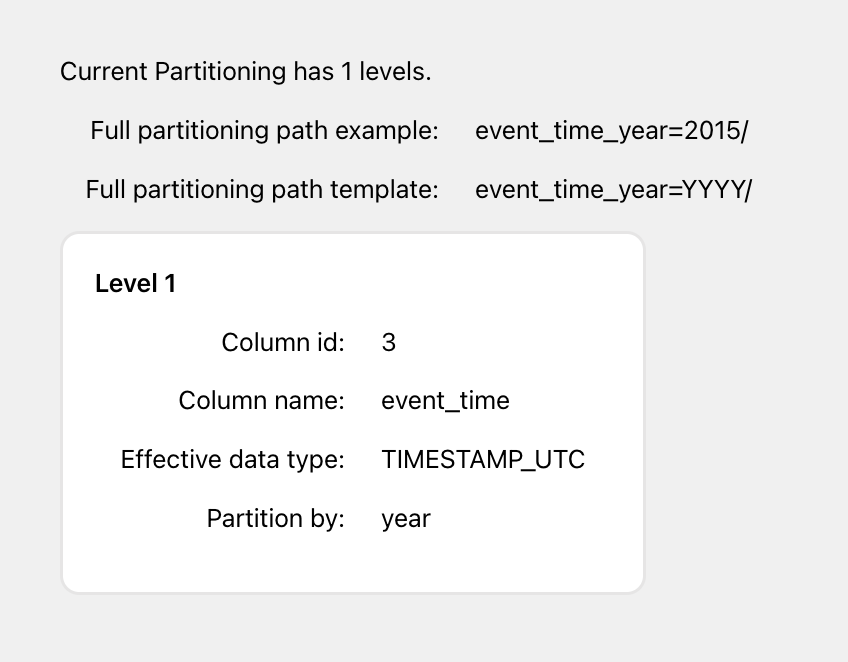
This helps users understand how the selected partition levels will organize their output files before running a conversion job.
You can adjust the partitioning configuration without manually editing directory-generation logic.
5. Run and Monitor Your Conversion Job
Once the configuration is ready, start the processing job from the Parqify interface.
Parqify processes the source data, applies the configured schema and optimization settings, and writes partitioned Parquet files to the destination.
You can monitor job progress, review processing results, and access logs through the interface.
How to Choose the Right Partitioning Strategy
More partitions do not automatically mean better performance. The best partitioning strategy depends on how your data is queried.
If most queries filter by month, monthly partitioning may be sufficient. If users frequently analyze individual days, daily partitioning may be more useful.
Columns with a large number of unique values, such as individual transaction IDs, are often poor partition candidates because they can create too many small partitions and files.
A good starting point is to choose partition columns that appear frequently in query filters and produce reasonably sized groups of data.
Partitioning and Analytics Engines
Partitioned Parquet datasets are commonly used with analytics platforms such as:
- Amazon Athena
- Apache Spark
- Trino
- Presto
- Other engines supporting partitioned Parquet datasets
To take advantage of partition pruning, query engines need to recognize the partition structure. Depending on the engine, this may require configuring an external table, registering partitions in a data catalog, or enabling partition discovery.
Parqify prepares the partitioned Parquet files. Query-engine metadata and table configuration remain separate steps when required by your platform.
From Raw Files to Analytics-Ready Parquet
Partitioning is an important part of preparing large datasets for efficient analytics. Combined with Parquet's columnar storage and compression, it helps organizations structure their data around real query requirements.
Traditionally, implementing this workflow may require custom scripts, data processing frameworks, and ongoing engineering maintenance.
Parqify offers a simpler approach: configure conversion, schemas, compression, and multi-level partitioning in one interface, then process your files in your own AWS environment.
Spend less time writing data conversion code and more time using your data.
Partition Parquet Without Building a Data Pipeline
With Parqify, you can configure multi-level partitioning, select date-based transformations, and optimize Parquet output through a web UI.
No custom Python or Spark partitioning script is required for these supported workflows.
Your data remains in your AWS environment, and you retain control over storage, networking, and access permissions.